robotmonkeys

the monkeys know all

Category: tech

  • Pinball Coffee Table

    Categories: ,

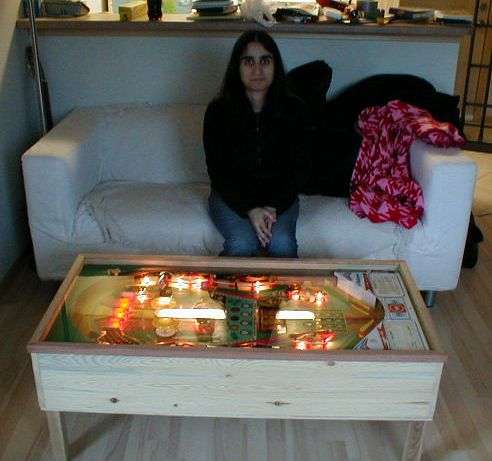
    When I first saw the Pinball coffee table back in 2006, I thought it looked cool (colored lights shining up on people’s faces always brings a warmth to the heart of this scifi geek.), but at the same time, I couldn’t imagine actually having one.

    A couple of years ago, I went to Shorty’s in Seattle. This bar has booths where the table has a lit pinball playfield in it, just like the pinball coffee table. (In fact, Shorty’s was the inspiration for the coffee table.) Suddenly, I thought that pinball coffee tables were actually feasible!

    I talked to some friends about it, but they’re all against the idea. As Ming put it, “It would look like a kid’s room.” It’s hard to really argue with her, when you see Ed Cheung’s table in the living room.

    I’m not criticizing the build, but I guess the idea. (Even though, I still kind of want one. Especially if it remained playable.) It’s a party piece, but not everyday piece. That’s what I’m saying.

  • Electree

    Categories: ,

    Ah, Vivien Muller! Is there anything you make that I won’t post? Above is Electree, his latest creation. It’s a purple Photonsynthese, and is being presented at the Palais de Tokyo in Paris on the occasion of the 1.618 sustainable luxury fair.

    Limited to 1000 editions. Price €4950 (~ $6354).

    I like it. I like the blue of Photonsynthese more though. Don’t like the price at all. More disturbingly, it’s just too derivative of his earlier work. It seems like the big change in this one is that it uses rare earth magnets instead of headphone jacks to mount the solar cells. Really, really don’t like that price.

  • Diaspora

    Categories:

    I ditched Facebook. I’ve grew tired of:

    1. RSS feeds not updating.
    2. Being frequently mysteriously logged out
    3. Having applications being added just for accidentally clicking on a damn Farmville-esque wall post.
    4. Being straight, and yet being served ads for gay dating sites.
    5. Applications getting all your information.
    6. Seemingly,. everyone getting your information.
    7. Being tracked.

    Facebook always gave me that shit tasted walled garden feeling of the late 90s. I hated how it how it seemed that more and and more techsavy people actually used it to send messages, rather than – you know – email. I like that status updates. I liked that sharing of links, but when I visted CNN.com after viewing Facebook, and seeing my friends’ activity on CNN, I flipped. There’s no reason why that information should be shared. I don’t think I got one of those damn pushed malware apps from Facebook, but I don’t know. Sure, I could have just configured some firewall to block a bunch of stuff, but voting with my feet is much more satisfying.

    Still, I like the social aspect. I am going to miss Mike and Lisa‘s comments. I really will. I like the sharing, but I want an archive of my activity. I want control. What should I do?

    Enter Diaspora.

    (more…)

  • Golden Shield Music

    Categories: ,

    The Great Firewall of China (officially known as “Golden Shield“) is lovely creation that tries to maintain a “harmonious” Internet experience. When I was in Beijing, I I noticed that it used a combination of DNS filtering (tibet.net, the official website of the Tibetan Government In Exile, does not resolve), and packet filtering on keywords. (“The connection has been reset.”). Tor got around it easily, but that may or may not be the case today. Like every other attempt to stamp out “undesirable” content, the ways to avoid detection were well known. How often they’re actually employed, is another question.

    So what use is the Great Firewall beyond being an somewhat effective tool of oppression? Marco Donnarumma has the answer. He uses it to make music. The IP addresses of the twelve “most screened” websites, are fed into a MIDI synthesizer. A single note is transformed by four voices based on the four bytes of the IP address. The notes are ordered by the number of pages blocked on each site.

    Via Unknown 8bit.

  • Winscape

    Categories: ,

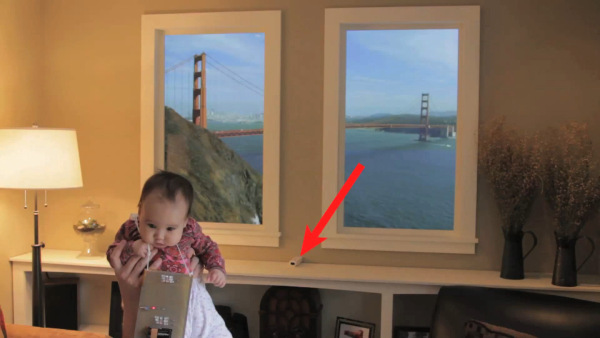
    Way back in 2002, and then later in 2004, Ryan Hoagland (old site) became both a brief old and new media sensation with both his Cityscape and Virtual Windows hacks.

    Well he’s back, with Winscape, a motion corrected update of Virtual Windows. Using two plasma televisions hooked up to a mac mini, wiimote, and an IR necklace, static photos and video can be perspective corrected for the viewer with the necklace.

    He says he’s planing on selling it as a kit for somewhere between $2.5k and $3k, which really isn’t that much when you consider that’s the cost of the hardware. (Alternately, the software is only $10.)

    Video after the jump.

    Previously.

    (more…)

  • Plantas Nómadas

    Categories:

    Now this is nifty.

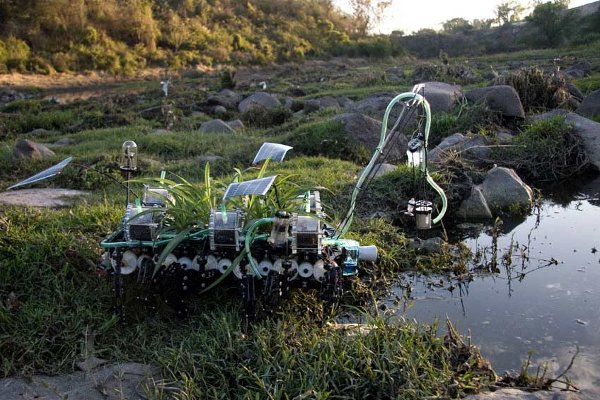
    We Make Money, Not Art interviews, Gilberto Esparza about his Plantas Nómadas (Nomadic Plants), an autonomous walking robot that is powered by a combination of solar cells and a microbial fuel cell. When the fuel cell output drops beneath some threshold, the bot seeks out a water source, extends a proboscis and refills the fuel cell. Additional water is used nourish a colony of on board plants.

    Gilberto’s earlier work is equally interesting. Parasitos Urbanos (Urban Parasites) (flashless site) was a series of robots inductively powered from electrical transmission lines that would move through the urban environment mimicking sounds they encounter.

    Previously.

  • iPad

    Categories:

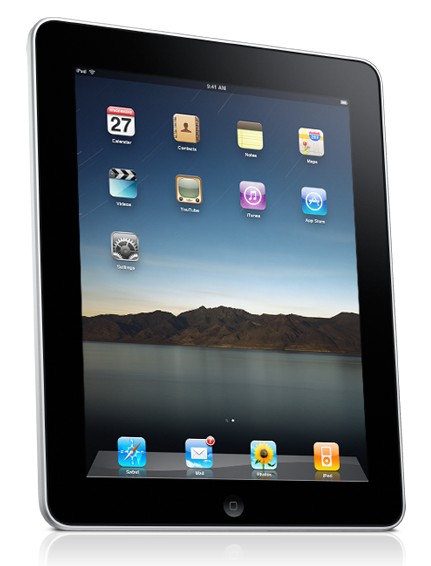
    I played with an iPad for a few minutes at Red Rock in Mountain View, and since everyone else to talking about it, I might as well too.

    It’s a big wireless touch screen display. That’s how you have to think of it. It’s not a “big iPod Touch,” anymore than an SUV is just a big Chevette. Big isn’t just better, it’s different.

    It’s not a replacement for the laptop or the desktop, since you can’t type long on it. It’s an addition. It’s for when you want to browse the Internet, and a laptop is too much. It’s for when you want to lookup something on IMDB while watching television. It’s for reading PDFs or finishing tweaking a presentation on a plane. It’s a device a for consumption, not creation. As commenter BadUncle put it on the Awl, “Steve Jobs has reinvented the clipboard.” (An iPad would have been perfect for all the years I helped my dad do end of year paint inventory.)

    Do I want one? I’m kind of ambivalent about it. I’d use one if I was given one, but I can’t imagine using it enough to be worth $500. It’s a toy. It’s a better looking Chumby.

    Does it foretell a dystopian future of locked down computers? Maybe. I can see the AppStore model being expanded into the traditional software market, and I really really do not like the AppStore. I don’t have a problem with the existence of the store. It provides a list of apps to download. I even don’t have a problem with Apple vetting the apps in the store. That’s useful for users. These apps are safe. Fine. What I don’t like is that there’s no other way to distribute applications for the iPhone and iPad except through the AppStore. That’s what really bugs me. That and the hypocritical and schizophrenic application of Apple’s rules, and that if AT&T or some other “strategic partner” doesn’t like your app, you’re shutdown. That’s telling me and my users how to use our machines. No one has that right.

    So in conclusion, I give it a warm maybe.

  • SmartLEDs

    Categories: ,

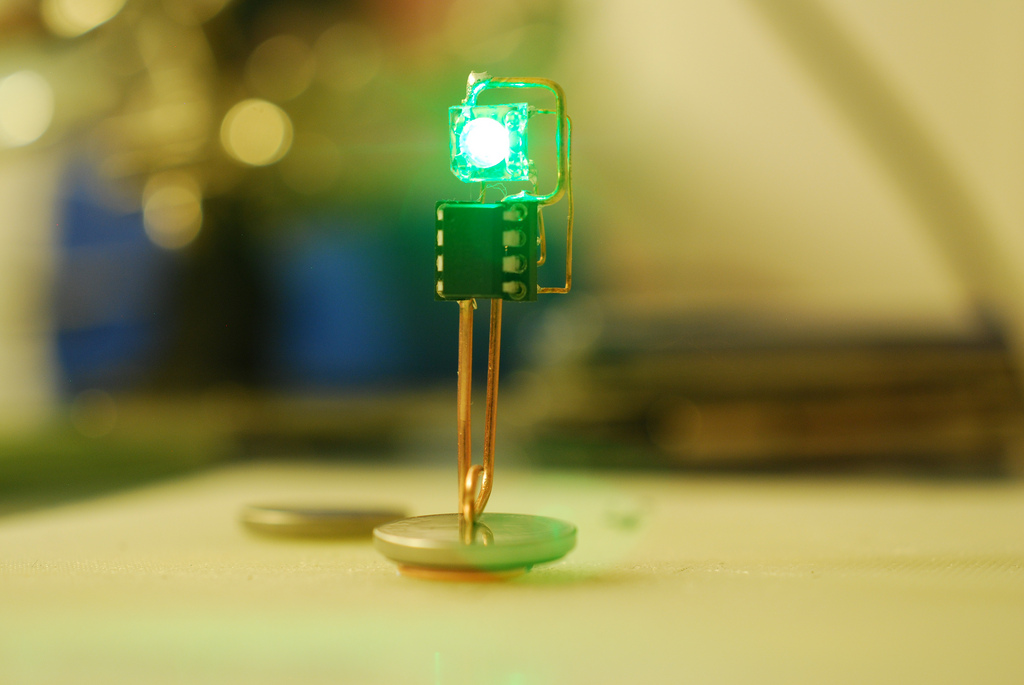
    Jim Blackhurst’s SmartLED SolarTherm is a minimalist information display. Consisting of an RGB LED, a watch, and an ATTiny25 microcontroller. The chip contains a temperature sensor whose reading is displayed as light pulses. According the comments on Makezine, the internal temperature sensor is +/- 10 C (+/- 18 F), so its not very useful.

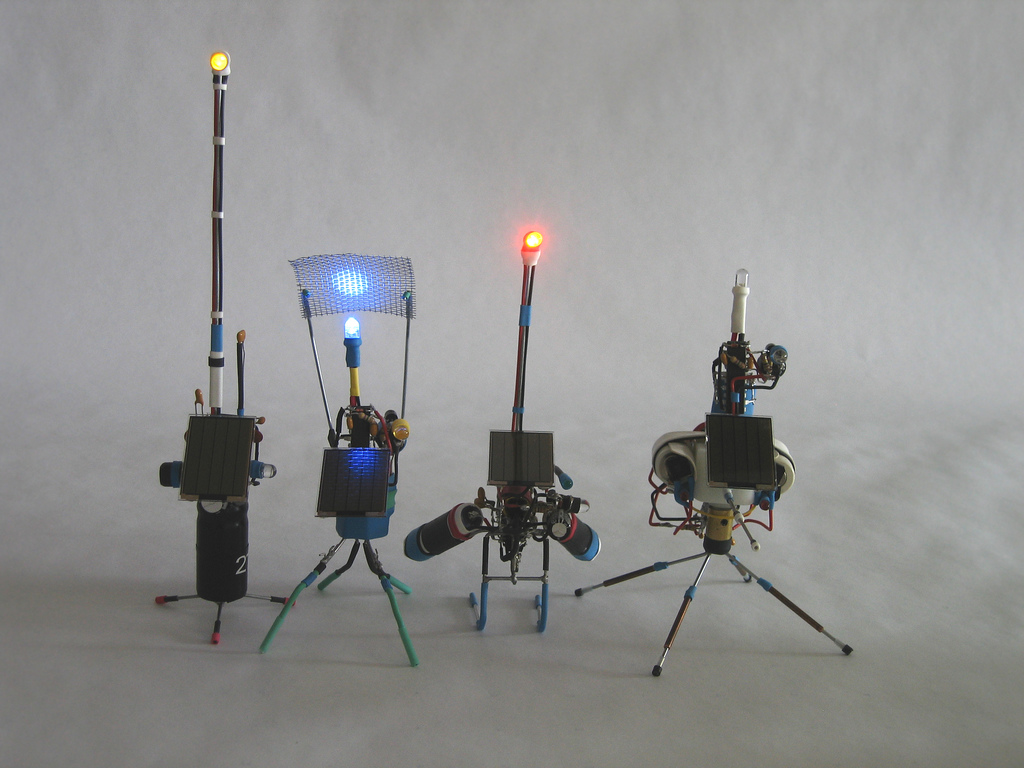
    SolarTherm is simpar to M27’s Zach DeBord’s pummers. These charge a capacitor from a solar cell, and when the light level drops, the capacitor discharges, and causes an LED to blink.

    While as an ambient displays these are visually interesting, especially Zach DeBord’s pummers, these seem to suffer from the main problem with all ambient displays. They trade simplicity for usefulness.

    I want the display to be both pretty, but also informative. The display needs to be immediately interrogated. Similar to the how a grandfather clock provides a chime ever 15 minutes to an hour, but also can be viewed in order to learn the exact time. I’m thinking of something like Riedi and Gloor’s Weather Diorama.

    Things like Nabaztag or the infinitely more endearing, Michael Kaminsky and Paul Dourish‘s SWEETPEA (aka “The Microsoft Barney Paper”) are more confusing than anything. Even baseball signs aren’t that confusing.

    Maybe the best ambient display I’ve seen was simply a string hanging from a DC small motor wired directly into an ethernet cable. As packets would pass, the motor would be powered, causing the string to wiggle. As the network activity increased, so would the vigorousness of the string’s dancing. The great thing about this display is that it’s immediately and intuitively interpretable, while something more complex requires the user to learn some of sign language.

  • Fish Tank

    Categories: , ,

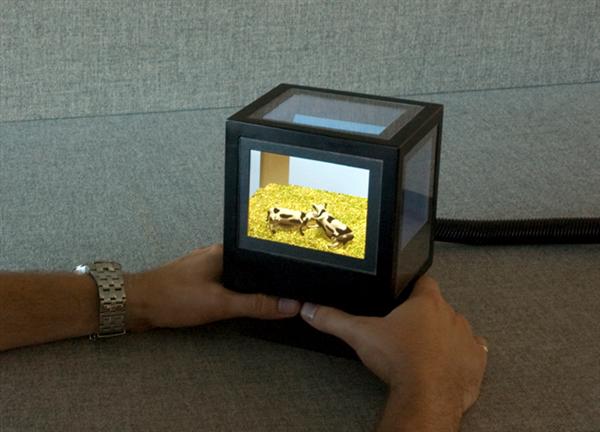
    Years ago, I had this idea for a virtual fish tank. It would have five LCD displays (possibly touch screen) and a 3D rendering of fish inside. Each face of the cube would display the corresponding camera angle. For years that idea sat in a notebook, because I had no idea how to actually do it, and was making it way harder than it had to be. (I really have no idea how to do anything more complex than a cube in OpenGL.)

    Well, it turns out someone at the University of British Columbia had the same idea, and built pCubee, a perspective corrected display box.

    At least it was hard to do.

    Fuck the iPad. I want this.

    Video after the jump.
    (more…)

  • imlibsetroot

    Categories: ,

    Way back in 2004 when I was still using a multiheaded Linux box as my primary machine, I wrote a command line utility to change the background picture of my desktop. I gave it the catchy name imlibsetroot in the vein of other similar utilities, such as xsetroot and Esetroot. The main difference between my utility and these others was that mine allowed you to set different pictures on each monitor.

    I posted it on my .edu account and must have made an announcement on Freshmeat, and figured no one else would ever use it. I mostly forgot about it. The program was pretty much complete, so it just sat there in “maintenance mode.” I used it regularly for a couple of years, added a single trivial enhancement/fix, and soon after that, I stopped using it when I switched to a mac.

    I’ve thought about it from time to time. Mostly whenever I’m forced to deal with Apple’s horrible desktop background preference pane. Then today, while engaging in a vanity google, I found this.

    Not only was there another user of imlibsetroot, but apparently he was a long time user, and fixed an actual bug, and then started hosting his fixed version himself.

    Wow.

    What else could I do? I downloaded his version, patched my version and then emailed him a new copy.

    Just in case there’s someone else out there using it and will stumble across this, I’m posting it here, along with original imlibsetroot webpage, but with a link to the newest version.

    Enjoy imlibsetroot 1.2!

    Update: Wed Mar 31 17:27:02 PDT 2010
    I got off my ass and wrote a wrapper script for MacOSX. (I don’t think multihead is supported on MacOSX.) imlibsetroot rides again!

    imlibsetroot

    A Xinerama Aware Background Changer

    imlibsetroot is pretty much Esetroot, but much more feature rich. This program was originally designed to set backgrounds on individual monitors in a multihead setup. Then composition was added so that it could be used with webcollage, but webcollage has its own program that does pretty much the same thing, so that was pretty much a waste of effort. Alas, I only checked how webcollage actually worked after composition was added.

    Anyway, this is what I use to set my background in sawfish.

    imlibsetroot requires Imlib2.

    Enjoy!